What Are Click to WhatsApp Ads?
Powerful Advertising for Indian Businesses
Click to WhatsApp Ads are a revolutionary advertising format that allows Indian businesses to drive direct conversations with potential customers through WhatsApp.
When Indian users click on these ads displayed on Facebook, Instagram, or other Meta platforms, they're instantly redirected to a WhatsApp chat with your business. This enables real-time communication in Hindi, English, or regional languages.
Unlike traditional ads that lead to landing pages, Click to WhatsApp Ads eliminate friction by connecting Indian customers directly with your business on a platform they already use daily.
With over 500 million WhatsApp users in India, this seamless integration makes them one of the most effective advertising formats for Indian businesses looking to generate leads, answer queries, and close sales.
Re-conversion: The Game-Changer
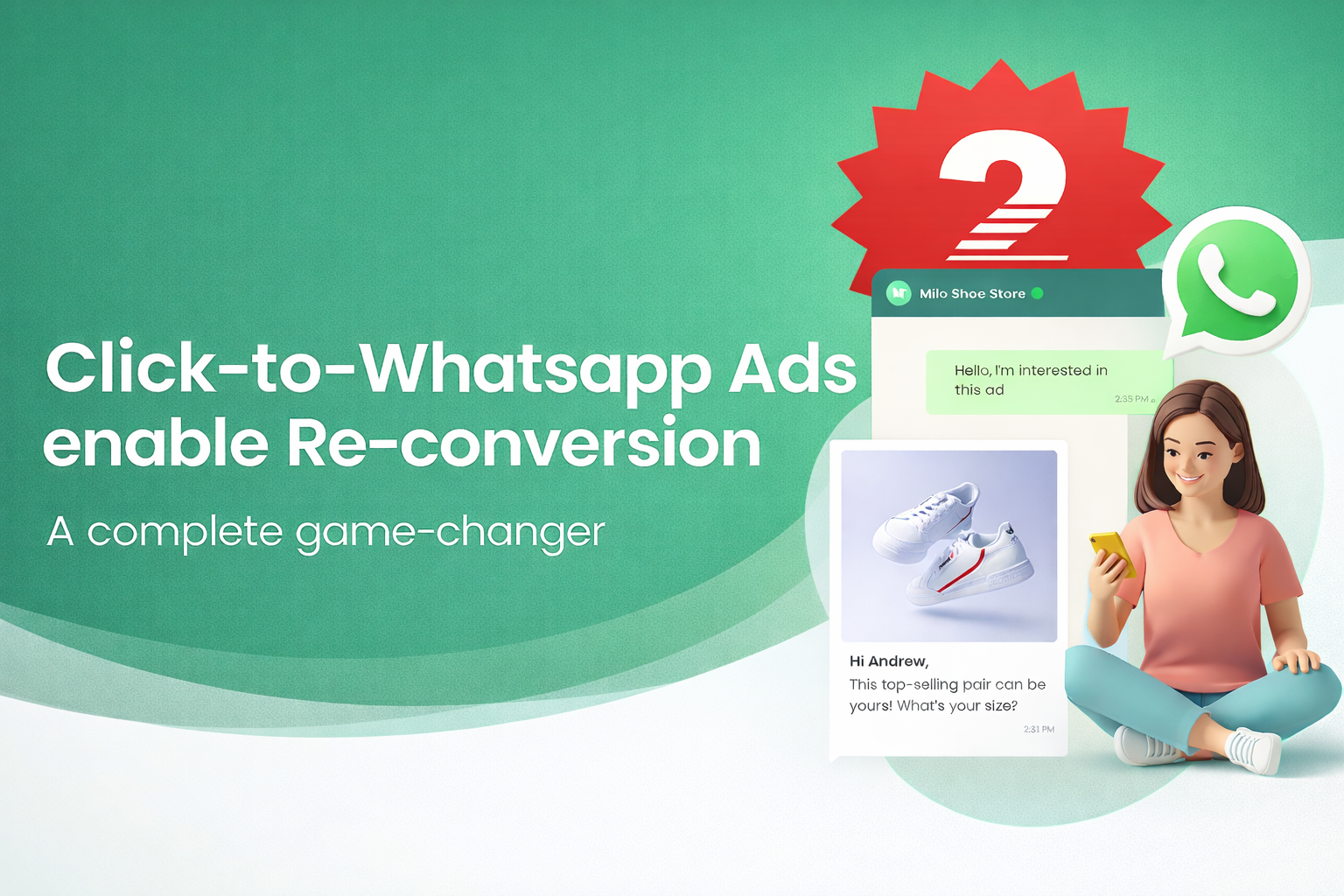
As shown in the visual above, Click to WhatsApp Ads enable powerful re-conversion strategies that traditional advertising simply cannot match. Unlike one-time interactions, WhatsApp conversations create an ongoing relationship with prospects.
Free Re-marketing Within 72 Hours: One of the most powerful advantages is the ability to re-engage prospects who clicked your ad but didn't convert immediately. Within the 72-hour messaging window, you can send follow-up messages, answer questions, provide additional information, or offer special incentives—all without additional ad spend.
Immediate Prospect Qualification: The instant conversation allows you to qualify leads in real-time. Instead of waiting for form submissions and manual follow-ups, you can immediately assess interest level, answer objections, and guide qualified prospects toward conversion—often within the same conversation.
Personalized Re-engagement: When prospects show interest but don't convert immediately, you can send personalized follow-ups based on their specific queries. This targeted approach significantly increases conversion rates compared to generic email campaigns or retargeting ads.
This re-conversion capability transforms Click to WhatsApp Ads from a simple lead generation tool into a complete customer acquisition and nurturing system, making it a true game-changer for businesses looking to maximize their marketing ROI.
Benefits of Click to WhatsApp Ads for Indian Businesses
Higher Conversion Rates
Click to WhatsApp Ads typically achieve 3-5x higher conversion rates compared to traditional click-to-website ads in the Indian market. Indian consumers prefer personal conversations over filling forms, making WhatsApp the perfect channel for engagement.
Instant Customer Engagement
Indian customers can start conversations immediately without leaving Facebook or Instagram. This instant engagement is crucial in India where consumers expect quick responses, reducing drop-off rates significantly.
Personal Touch for Indian Market
WhatsApp conversations allow for personalized interactions in Hindi, English, or regional languages, building trust and rapport that resonates deeply with Indian consumers who value personal relationships.
Cost-Effective for Indian Businesses
With lower cost-per-lead (CPL) starting from ₹5-15 per lead, Click to WhatsApp Ads provide excellent ROI for Indian businesses, especially SMEs and startups looking to maximize their marketing budget.
Perfect for Mobile-First India
With over 500 million WhatsApp users in India, these ads are perfectly suited for the mobile-first consumer behavior that dominates the Indian digital marketing landscape.
Rich Media Support
WhatsApp supports images, videos, documents, and location sharing in Hindi and regional languages, allowing Indian businesses to create richer customer interactions than traditional messaging platforms. Use WhatsApp Broadcasting to send these rich media messages to multiple customers efficiently.
How Click to WhatsApp Ads Work in India
How It Works
Click to WhatsApp Ads create a frictionless journey from advertisement to conversation. Businesses create ads through Meta Ads Manager using the "Click to Message" objective, requiring a WhatsApp Business Account or API configured with a verified phone number.
When users click these ads on Facebook, Instagram, Stories, or Messenger, they're instantly redirected to WhatsApp with a pre-filled message. The business receives the message immediately and can respond in real-time, creating a personal connection that significantly increases conversion likelihood.
This seamless transition eliminates the friction of traditional advertising—no landing pages, forms, or multiple steps. Users stay in a familiar environment (WhatsApp) and can start conversations with a single click.
Requirements
To get started, you need:
- Facebook Business Manager account - Foundation for managing ads
- WhatsApp Business Account (for small businesses) or WhatsApp Business API (for enterprises)
- Verified business phone number - Essential for account setup
- Compliance - Adherence to Meta's advertising policies and local regulations
Compliance Note: Ensure compliance with data privacy laws and WhatsApp Business Policy. Use verified business numbers and maintain opt-in records for all customers.
Complete Setup Guide: Creating Your First Click to WhatsApp Ad
Step 1: Set Up WhatsApp Business Account
Download WhatsApp Business app or set up WhatsApp Business API through a Business Solution Provider (BSP)
Verify your business phone number and complete your business profile with accurate information
Step 2: Connect WhatsApp to Facebook
Go to Facebook Business Manager → Business Settings → WhatsApp Accounts
Click "Add" and follow the prompts to connect your WhatsApp Business number
Verify the connection by sending a test message
Step 3: Create Your Ad Campaign
Open Meta Ads Manager and click "Create"
Select "Messages" as your campaign objective
Choose "WhatsApp" as your messaging destination
Step 4: Configure Ad Set
Budget: Set your daily or lifetime budget
Audience: Define your target audience using demographics, interests, behaviors, and custom audiences
Placements: Choose where your ads will appear (Facebook Feed, Instagram Feed, Stories, etc.)
Optimization: Select "Conversations" as your optimization goal
Step 5: Design Your Ad Creative
Format: Choose Single Image, Video, Carousel, or Collection
Media: Upload high-quality images or videos (recommended: 1080x1080px for square, 1080x1920px for Stories)
Primary Text: Write compelling copy that clearly communicates your value proposition
Headline: Create an attention-grabbing headline (up to 27 characters)
Call-to-Action: Select "Send WhatsApp Message" or "Contact Us"
Step 6: Set Up Pre-Filled Message
Create a pre-filled message that appears when users click your ad
Keep it concise, friendly, and action-oriented (e.g., "Hi! I'm interested in your [product/service]")
This message helps users understand what to expect and reduces friction
Step 7: Review and Launch
Review all settings, targeting, and creative elements
Submit for approval (usually takes 24-48 hours)
Once approved, your ad will start running
Advanced Optimization Strategies
1. Audience Targeting Optimization
Effective targeting is the foundation of successful campaigns. Use these strategies:
- Lookalike Audiences: Create audiences based on existing customers who engaged via WhatsApp to reach similar prospects
- Custom Audiences: Retarget website visitors, app users, or previous ad engagers who already know your brand
- Interest Targeting: Combine demographics with interests related to your product or service
- Behavioral Targeting: Focus on users showing purchase behaviors and engagement patterns indicating intent
This multi-layered approach ensures your ads reach people actively demonstrating purchase intent, not just general interest.
2. A/B Testing Framework
Systematically test different elements to improve performance:
| Element to Test | What to Measure | Expected Impact |
|---|---|---|
| Ad Creative (Image vs Video) | Click-through rate, Cost per click | 15-30% improvement |
| Headline Variations | Engagement rate, Message starts | 10-20% improvement |
| Pre-filled Message | Response rate, Conversion rate | 20-40% improvement |
| Call-to-Action Button | Click-through rate | 5-15% improvement |
| Audience Segments | Cost per conversation, ROI | 25-50% improvement |
3. Ad Creative Best Practices
Your ad creative determines whether users engage. Follow these principles:
- High-Quality Visuals: Use bright, clear images/videos that showcase your product effectively
- Text Overlay: Include key messaging directly on images for mobile users scrolling quickly
- Social Proof: Add testimonials, ratings, or user counts to build trust
- Urgency: Create limited-time offers or scarcity messaging to drive immediate action
- Mobile-First: Design and test for mobile devices where most users will see your ads
4. Message Response Optimization
Your response strategy directly impacts conversion rates. Key practices:
- Speed: Respond within 5 minutes during business hours to prevent lost opportunities
- Automated Welcome: Set up instant acknowledgment messages using WhatsApp Automation to set expectations
- Personalization: Use customer names and reference specific queries to build rapport
- Rich Media: Send product images, videos, or catalogs directly through WhatsApp. Use WhatsApp Broadcasting for efficient multi-customer outreach
- Clear Actions: Guide conversations toward specific next steps (bookings, purchases, consultations)
5. Bid Strategy Optimization
Choose the right bidding strategy for your goals:
- Lowest Cost: Maximize volume within a fixed budget
- Cost Cap: Maintain average cost per result while maximizing volume
- Bid Cap: Set strict maximum spend per result for tight control
- Target Cost: Maintain consistent cost per result for predictable spending
Best Practices & Pro Tips
Content Strategy
Effective content strategy drives engagement:
- Clear Value Proposition: Immediately communicate what users gain by clicking
- Problem-Solution Framework: Address specific challenges your audience faces
- Emotional Triggers: Use urgency, curiosity, or FOMO authentically
- Localization: Adapt messaging for different languages and cultures
Timing & Frequency
- Peak Hours: Schedule ads when your audience is most active
- Day-Parting: Adjust bids based on time-of-day performance
- Frequency Capping: Limit to 2-3 impressions per user per week to prevent ad fatigue
Landing Experience
- Pre-filled Messages: Provide relevant context to reduce user effort
- Quick Responses: Set up automated acknowledgments for instant engagement
- Clear Business Hours: Communicate response times to manage expectations
Compliance & Trust
- Data Protection: Comply with GDPR, CCPA, and local regulations
- Explicit Consent: Only message users who have opted in
- Easy Unsubscribe: Provide clear opt-out options
- Verified Badge: Use WhatsApp Business API for added credibility
Real-World Case Studies from India
Case Study 1: Mumbai-Based Fashion E-commerce Brand
Mumbai, Maharashtra | Fashion & Apparel
A Mumbai-based fashion retailer faced the common challenge of high cart abandonment rates and low sales conversions in the competitive Indian e-commerce market.
They implemented Click to WhatsApp Ads targeting users who had viewed products but didn't complete purchases, with personalized messages in Hindi and English offering style advice and product recommendations.
The results exceeded expectations with a 45% increase in conversion rate and a 35% reduction in cart abandonment.
The campaign achieved 60% lower cost per acquisition at just ₹8 per lead compared to ₹20 through traditional retargeting methods.
Average order value increased by 25% through personalized recommendations delivered via WhatsApp conversations, with customers appreciating the ability to ask questions in their preferred language.
Case Study 2: Delhi NCR Real Estate Agency
Delhi NCR | Real Estate
A Delhi NCR real estate agency struggled to generate qualified leads for property viewings through traditional contact forms.
They created Click to WhatsApp Ads showcasing property images with instant booking options directly through WhatsApp, making it easier for potential buyers to express interest and ask questions in Hindi or English.
The campaign generated three times more qualified leads compared to contact forms, with 50% faster response times to inquiries.
Most impressively, 40% of WhatsApp conversations converted directly to property viewings, resulting in an ROI of 8:1 on ad spend.
The personal touch of WhatsApp conversations helped build trust and urgency that contact forms couldn't match, especially important in the Indian real estate market where trust is crucial.
Case Study 3: Bangalore Healthcare Clinic
Bangalore, Karnataka | Healthcare
A Bangalore-based healthcare clinic needed to increase appointment bookings while maintaining patient privacy and reducing administrative burden.
They implemented Click to WhatsApp Ads for appointment scheduling, allowing patients to book consultations privately through WhatsApp in Kannada, Hindi, or English - languages their patients preferred.
The results included a 70% increase in appointment bookings and a 90% patient satisfaction rate.
The clinic also reduced no-show rates by 30% through automated WhatsApp reminders in patients' preferred languages, while administrative workload decreased by 50% as patients handled their own scheduling through the convenient WhatsApp interface.
Case Study 4: Pune-Based SaaS Startup
Pune, Maharashtra | B2B SaaS
A Pune-based B2B SaaS startup needed to improve demo sign-up rates to accelerate their sales pipeline in the competitive Indian market.
They implemented Click to WhatsApp Ads targeting Indian decision-makers with personalized demo invitations in Hindi and English, creating a direct line of communication that bypassed traditional email barriers.
The campaign achieved a 2.5x increase in demo requests and a 55% higher demo-to-trial conversion rate.
The personal nature of WhatsApp conversations helped build relationships faster with Indian businesses, reducing the average sales cycle by 20%.
Most importantly, cost per qualified lead decreased by 40% to ₹150 per lead, making the sales process significantly more efficient for the Indian market.
Common Pitfalls & How to Avoid Them
1. Poor Response Times
Problem: Delayed responses lead to lost opportunities and frustrated customers.
Solution: Set up automated welcome messages and ensure your team responds within 5 minutes during business hours. Consider using WhatsApp Chatbot for initial inquiries.
2. Generic Messaging
Problem: One-size-fits-all messages don't resonate with diverse audiences.
Solution: Create audience-specific ad sets with tailored messaging. Use dynamic content based on user behavior and preferences.
3. Ignoring Analytics
Problem: Not tracking the right metrics leads to poor optimization decisions.
Solution: Monitor key metrics: click-through rate, cost per click, message starts, response rate, conversion rate, and ROI. Use Facebook Pixel and UTM parameters for deeper insights.
4. Overlooking Mobile Optimization
Problem: Ads designed for desktop don't perform well on mobile devices.
Solution: Always design mobile-first. Test your ads on actual mobile devices before launching.
5. Insufficient Budget Allocation
Problem: Too small budgets prevent campaigns from reaching the learning phase.
Solution: Allocate sufficient budget (minimum $50-100/day) to allow Facebook's algorithm to optimize. Increase budget gradually as performance improves.
6. Neglecting Ad Fatigue
Problem: Showing the same ad repeatedly leads to decreased engagement.
Solution: Refresh creatives every 2-3 weeks. Use frequency capping and rotate multiple ad variations.
7. Incomplete Business Profile
Problem: Incomplete WhatsApp Business profiles reduce trust and credibility.
Solution: Fill out all profile fields: business description, hours, website, address, and category. Add a professional profile picture and cover image.
8. Not Testing Different Formats
Problem: Sticking to one ad format limits reach and performance.
Solution: Test single images, videos, carousels, and collections to find what works best for your audience.
Click to WhatsApp Ads vs Other Ad Types
| Ad Type | Conversion Rate | Cost Per Lead | Engagement Level | Best For |
|---|---|---|---|---|
| Click to WhatsApp Ads | High (3-5%) | Low-Medium | Very High | Lead gen, customer service, sales |
| Click to Website Ads | Medium (1-2%) | Medium | Medium | Brand awareness, website traffic |
| Lead Generation Ads | Medium-High (2-3%) | Medium | Medium | Form submissions, email lists |
| Messenger Ads | High (3-4%) | Low-Medium | High | Customer support, engagement |
| Video Ads | Low-Medium (0.5-1.5%) | High | High | Brand awareness, storytelling |
Why Click-to-WhatsApp Path Wins: A Detailed Comparison
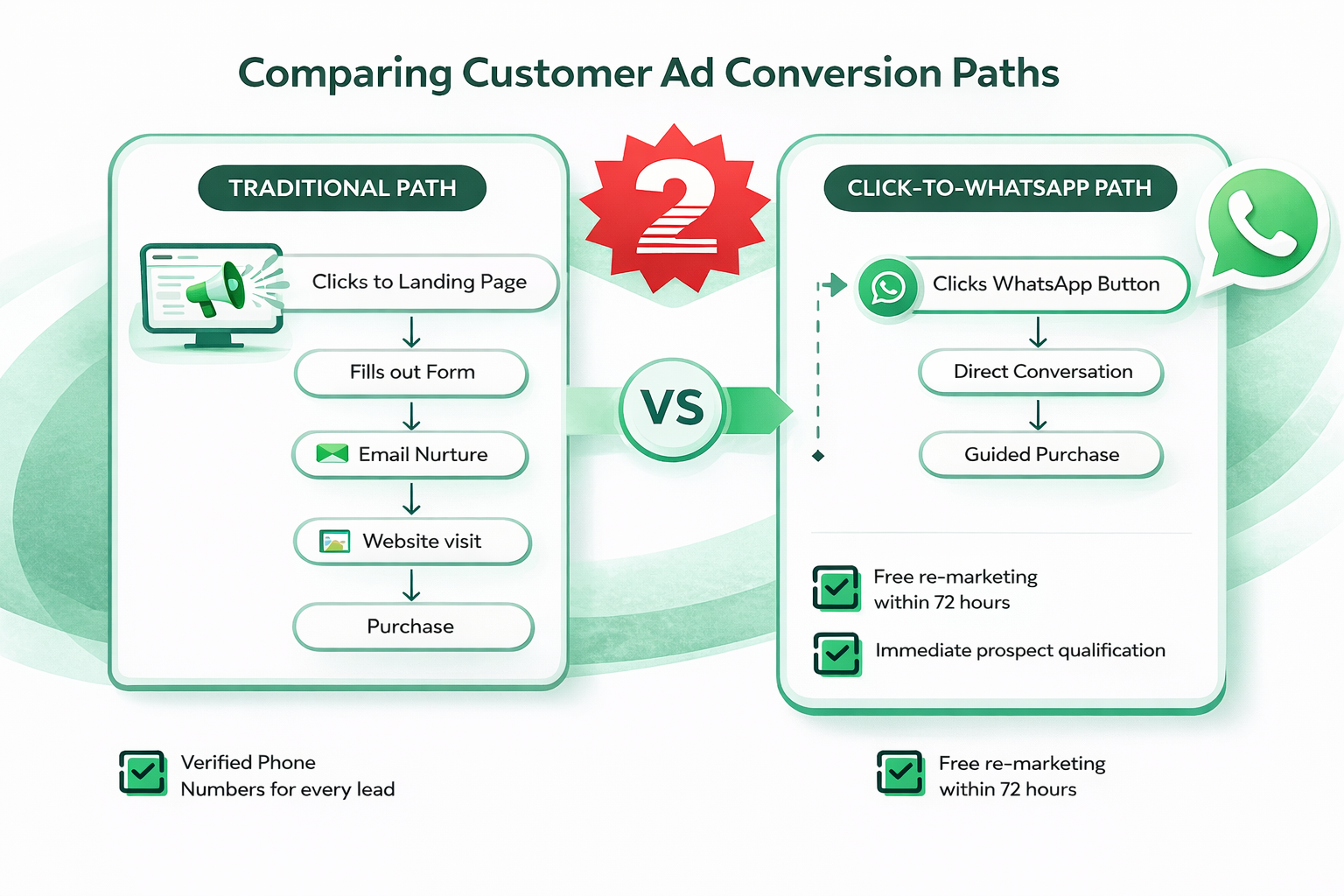
The comparison above clearly illustrates why Click to WhatsApp Ads deliver superior results. Let's break down the key differences:
The Traditional Path (5 Steps, Higher Friction)
The traditional conversion path involves multiple steps that create friction and drop-off points:
- Clicks to Landing Page: Users leave the social platform, increasing bounce risk
- Fills out Form: Requires time and effort, often abandoned mid-process
- Email Nurture: Delayed communication, low open rates, spam filters
- Website Visit: Requires another action from the prospect
- Purchase: Final conversion after multiple touchpoints
While this path provides verified phone numbers, the lengthy process results in significant drop-off at each stage, with only a small percentage completing the entire journey.
The Click-to-WhatsApp Path (3 Steps, Lower Friction)
The WhatsApp path eliminates friction and accelerates conversion:
- Clicks WhatsApp Button: One-click action, no platform switching
- Direct Conversation: Immediate, personal engagement in familiar environment
- Guided Purchase: Real-time assistance leads to faster conversions
Key Advantages:
- Free Re-marketing Within 72 Hours: Unlike traditional paths that require new ad spend for retargeting, WhatsApp allows free follow-up messages for 72 hours after initial contact, dramatically improving conversion rates
- Immediate Prospect Qualification: Real-time conversations enable instant qualification, allowing you to focus resources on hot leads while quickly identifying and nurturing warm prospects
This streamlined path reduces conversion time from days or weeks to hours or even minutes, while the free re-marketing window ensures you can nurture prospects without additional ad costs—a significant advantage over traditional advertising methods.
When to Use Click to WhatsApp Ads
Click to WhatsApp Ads excel when you want immediate, personal customer engagement that goes beyond traditional advertising. They're particularly effective for businesses that rely on conversations to close sales, where the personal touch and real-time interaction make a significant difference in conversion rates.
These ads work best when you have resources to respond quickly to inquiries, as delayed responses can negate the advantages of instant engagement. Your target audience should be active on WhatsApp, which is increasingly common across most demographics and geographies. Industries that benefit most include e-commerce, real estate, healthcare, and services where personal consultation and relationship-building are crucial to the sales process.
When to Use Other Ad Types
Website Ads serve better when your primary goal is driving traffic to specific landing pages or product pages where users need to browse multiple options or complete complex forms. Lead Gen Ads work well when you prefer structured form submissions over conversations, particularly for businesses that need standardized information collection.
Video Ads remain the best choice when brand storytelling and awareness are your primary goals, allowing you to create emotional connections and build brand recognition before driving specific actions.
Analytics & Performance Tracking
Key Metrics to Track
- Click-Through Rate (CTR): Percentage of people who clicked your ad
- Cost Per Click (CPC): Average amount spent per click
- Message Starts: Number of conversations initiated (primary goal)
- Cost Per Message Start: Average cost to generate one conversation
- Response Rate: Percentage of messages you respond to
- Response Time: How quickly you engage with customers
- Conversion Rate: Percentage of conversations leading to desired actions
- Return on Ad Spend (ROAS): Revenue generated per dollar spent
Setting Up Tracking
- Facebook Pixel: Track website conversions from your ads
- UTM Parameters: Enable Google Analytics tracking for additional insights
- WhatsApp Business API Analytics: Native metrics from your BSP or Meta
- CRM Integration: Track leads through the entire sales funnel
Optimization Based on Data
- Pause Underperformers: Reallocate budget to winning campaigns
- Peak Engagement Times: Adjust scheduling based on analytics
- Message Analysis: Refine messaging based on what drives conversions
- Customer Lifetime Value: Track long-term ROI including repeat business
Industry-Specific Use Cases for Indian Businesses
E-commerce & Retail (India)
Indian e-commerce businesses leverage Click to WhatsApp Ads for product inquiries in Hindi, English, and regional languages, creating a shopping assistant experience that helps customers find exactly what they need.
Order tracking and support through WhatsApp provides real-time updates in local languages, significantly improving customer satisfaction in the price-sensitive Indian market.
Popular in: Mumbai, Delhi, Bangalore | Languages: Hindi, English, Marathi, Tamil, Telugu
Real Estate (India)
Indian real estate agencies use Click to WhatsApp Ads to handle property inquiries and offer virtual tours, making it easy for potential buyers to explore properties without scheduling formal appointments.
Appointment scheduling happens seamlessly through WhatsApp in Hindi or regional languages, crucial for the relationship-driven Indian real estate market.
Popular in: Delhi NCR, Mumbai, Bangalore | Languages: Hindi, English, Regional languages
Healthcare & Wellness (India)
Indian healthcare providers utilize Click to WhatsApp Ads for appointment bookings in Hindi, English, and regional languages, offering patients a convenient and private way to schedule consultations.
Prescription reminders help patients stay on track, while health consultation inquiries allow patients to ask questions before committing to appointments.
Popular in: All major cities | Languages: Hindi, English, Regional languages
Education & Training (India)
Indian educational institutions use Click to WhatsApp Ads for course inquiries and enrollment in Hindi and English, making it easy for prospective students to learn about programs.
Student support through WhatsApp provides immediate assistance, while schedule consultations allow prospective students to book sessions with admissions counselors.
Popular in: All cities | Languages: Hindi, English, Regional languages
Financial Services (India)
Indian financial services companies leverage Click to WhatsApp Ads for product information requests, allowing potential clients to learn about services without committing to formal meetings.
Account inquiries can be handled quickly through WhatsApp in Hindi or English, improving customer service efficiency in the trust-sensitive Indian financial market.
Popular in: Metro cities | Languages: Hindi, English
Hospitality & Travel (India)
Indian hospitality businesses use Click to WhatsApp Ads for booking inquiries in Hindi and English, providing a personal touch that builds trust.
Travel itinerary assistance helps Indian travelers plan trips, while special requests can be communicated directly through WhatsApp, ensuring personalized service that exceeds expectations.
Popular in: Tourist destinations | Languages: Hindi, English
Cost Analysis & Budget Planning
Understanding Costs
Click to WhatsApp Ads operate on CPC (cost-per-click) or CPM (cost-per-thousand-impressions) models. Costs vary based on:
- Target Audience: Highly competitive demographics command higher prices
- Ad Quality: Well-performing ads receive lower costs from Facebook's algorithm
- Bidding Strategy: Determines how aggressively you compete for placements
- Industry & Seasonality: Peak seasons drive costs higher
- Geographic Location: Markets with higher purchasing power see higher costs
Average Costs for Indian Market
| City/Region | Avg. CPC (₹) | Avg. CPM (₹) | Cost Per Message Start (₹) |
|---|---|---|---|
| Metro Cities (Mumbai, Delhi, Bangalore) | ₹4 - ₹15 | ₹40 - ₹120 | ₹15 - ₹60 |
| Tier 1 Cities (Pune, Hyderabad, Chennai) | ₹3 - ₹12 | ₹30 - ₹100 | ₹12 - ₹50 |
| Tier 2 Cities (Jaipur, Lucknow, Indore) | ₹2 - ₹8 | ₹20 - ₹80 | ₹8 - ₹35 |
| Tier 3 Cities & Rural | ₹1 - ₹5 | ₹10 - ₹50 | ₹5 - ₹25 |
Note: Costs vary based on industry competition, ad quality, and targeting. Indian businesses typically see 30-40% lower costs compared to international markets due to higher WhatsApp adoption and lower competition.
Budget Planning Tips
- Start Small: Begin with ₹4,000-8,000 per day ($50-100) to test creatives and audiences
- Scale Gradually: Increase budget 20-30% weekly for winning campaigns
- Account for Response Costs: Factor in staff time or WhatsApp Chatbot expenses for handling conversations
- Set Clear Goals: Define target cost per lead (₹5-15) or ROI before launching
- Monitor Daily: Adjust budgets based on performance data
ROI Calculation for Indian Businesses
To calculate ROI for Click to WhatsApp Ads in the Indian market, follow these steps:
Step 1: Track total ad spend in INR (e.g., ₹50,000 per month)
Step 2: Count conversations generated (e.g., 500 conversations)
Step 3: Measure conversions from those conversations (e.g., 50 sales)
Step 4: Calculate revenue generated (e.g., ₹5,00,000 from 50 sales at ₹10,000 average order value)
Step 5: Calculate ROI = (Revenue - Ad Spend) / Ad Spend × 100
Example: ROI = (₹5,00,000 - ₹50,000) / ₹50,000 × 100 = 900% ROI
Frequently Asked Questions
Click to WhatsApp Ads are paid advertisements on Facebook/Instagram that redirect users to WhatsApp. Regular WhatsApp marketing involves sending messages to your existing contact list. Click to WhatsApp Ads help you acquire new customers, while regular WhatsApp marketing helps you engage existing ones.
No, you don't need extensive technical resources. Basic knowledge of Facebook Ads Manager is sufficient. However, for advanced features like WhatsApp Business API, you may need to work with a Business Solution Provider (BSP) or have technical support.
You can track performance through Meta Ads Manager (metrics like clicks, message starts, cost per result), WhatsApp Business API analytics, Facebook Pixel for website conversions, and CRM integration for lead tracking through your sales funnel.
For Indian businesses, we recommend starting with at least ₹4,000-8,000 per day (approximately $50-100) to allow Facebook's algorithm to optimize effectively. Smaller budgets may not reach the learning phase, resulting in poor performance. Indian businesses typically see lower costs per lead (₹5-15) compared to international markets due to higher WhatsApp adoption.
Click to WhatsApp Ads work exceptionally well for Indian industries, especially those requiring personal interaction like e-commerce, real estate, healthcare, education, and services. Popular sectors in India include fashion e-commerce (Mumbai, Delhi), real estate (Delhi NCR, Bangalore), healthcare (all metros), and education (pan-India). However, ensure compliance with Meta's advertising policies, TRAI regulations, and Indian data privacy laws for your industry.
Ideally, respond within 5 minutes during business hours. Quick responses significantly improve conversion rates. Set up automated welcome messages to acknowledge inquiries instantly, then follow up with personalized responses.
WhatsApp Business App is free and suitable for small businesses with basic needs. WhatsApp Business API offers advanced features like automation, analytics, multiple user access, and integration with business tools, making it better for larger businesses or those handling high message volumes. Check WhatsApp Business API pricing 2026 for detailed cost information.
Currently, Click to WhatsApp Ads are primarily available through Meta's ad platforms (Facebook, Instagram, Messenger, and Audience Network). However, you can use WhatsApp click-to-chat links in ads on other platforms like Google Ads, though the integration won't be as seamless.
Prevent ad fatigue by: refreshing creatives every 2-3 weeks, using frequency capping (limit to 2-3 impressions per user per week), creating multiple ad variations, rotating between different messaging angles, and monitoring frequency metrics in Ads Manager.
If you don't respond within 24 hours, you'll lose the ability to send template messages to that user. They can still message you, but you'll need to respond within the 24-hour window to continue the conversation. Poor response rates can also negatively impact your ad performance and account quality.
Conclusion
Click to WhatsApp Ads combine the reach of Facebook and Instagram with the personal touch of WhatsApp, delivering superior results in lead generation, customer engagement, and sales conversion.
Success requires understanding your audience, creating compelling creatives, optimizing continuously, and maintaining excellent customer service. The key is providing exceptional value, responding quickly, and refining your approach based on data.